Follower fetching in Aiven for Apache Kafka®
Follower fetching in Aiven for Apache Kafka allows consumers to retrieve data from the nearest replica instead of always fetching from the partition leader. This feature optimizes data fetching by leveraging Apache Kafka's rack awareness, which treats each availability zone (AZ) as a rack.
Benefits
- Reduced network costs: Fetching data from the closest replica minimizes inter-zone data transfers, reducing costs.
- Lower latency: Fetching from a nearby replica reduces the time it takes to receive data, improving overall performance.
Follower fetching is supported on AWS (Amazon Web Services) and Google Cloud.
How it works
Aiven for Apache Kafka uses rack awareness to optimize data fetching and maintain availability. Each availability zone (AZ) is treated as a rack.
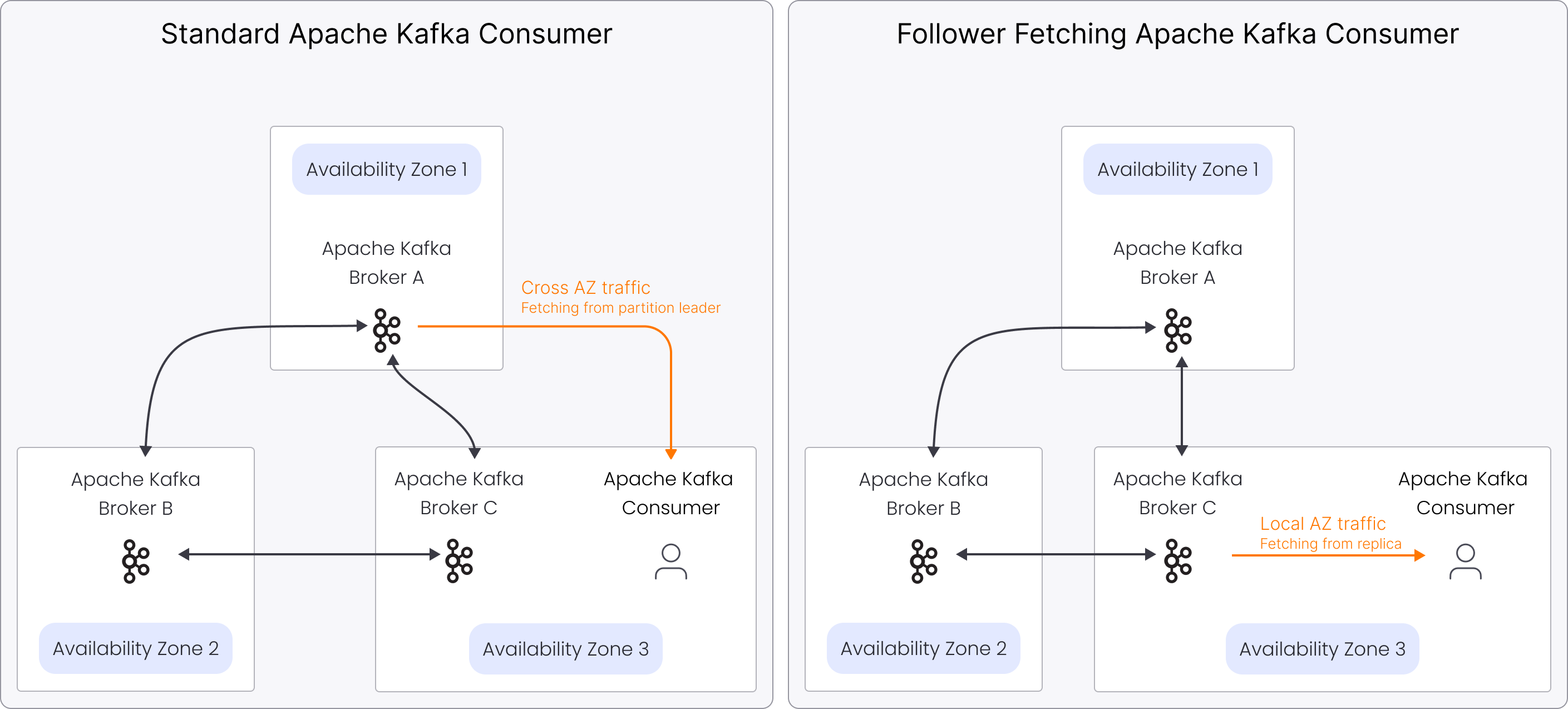
Rack awareness
Rack awareness provides the metadata that follower fetching relies on.
In Aiven for Apache Kafka, each availability zone (AZ) is treated as a rack. Each
Apache Kafka broker has a broker.rack value that corresponds to the AZ where the
broker runs:
- AWS: AZ IDs such as
use1-az1 - Google Cloud: AZ names such as
europe-west1-b
Aiven for Apache Kafka automatically manages the broker.rack setting. You do not
need to configure it manually.
Follower fetching mechanism
Follower fetching builds on rack awareness to allow consumers to fetch data from the
nearest replica. Apache Kafka consumers use the client.rack setting to specify their
AZ, ensuring they fetch data from the closest replica when possible.
Configuration settings
-
broker.rack: This setting corresponds to the AZ where each Apache Kafka broker is deployed and helps manage data replication efficiently. Apache Kafka brokers in the same AZ have the samebroker.rackvalue, likeuse1-az1. Aiven for Apache Kafka simplifies this process by automatically managing thebroker.racksetting, eliminating the need for manual configuration. -
client.rack: This setting on the Apache Kafka consumer indicates the AZ where the consumer is running. It allows you to fetch data from the nearest replica. For example, settingclient.racktouse1-az1on AWS oreurope-west1-bon Google Cloud ensures that the consumer fetches data from the nearest broker in the same AZ. Configure this setting to retrieve data from the closest replica.
Follower fetching in Kafka Connect and MirrorMaker 2
Follower fetching is not enabled by default on the Aiven for Apache Kafka service. When it is enabled on the Aiven for Apache Kafka service, Aiven for Apache Kafka® Connect and Aiven for Apache Kafka® MirrorMaker 2 apply rack-aware fetching based on the availability zone (AZ) where each node runs.
Kafka Connect
Kafka Connect assigns a rack value based on the availability zone where each Kafka Connect node runs.
Sink connectors use this value when consuming data from Kafka. If rack-aware fetching is supported by the Kafka cluster, sink connectors prefer reading from replicas in the same availability zone.
Source connectors do not use follower fetching.
MirrorMaker 2
MirrorMaker 2 assigns a rack value based on the availability zone where the
MirrorMaker 2 node runs for each replication flow where
follower_fetching_enabled=true.
MirrorMaker always sets a rack value based on the node availability zone when follower fetching is enabled.
If the source Kafka cluster does not support follower fetching or uses different rack identifiers, Kafka ignores the rack value and MirrorMaker reads from partition leaders.
To disable rack-aware fetching for a specific replication flow, set Follower fetching enabled to off when creating or editing the replication flow. For details, see Configure rack awareness in Aiven for Apache Kafka® MirrorMaker 2.
Related pages